In this Guide, I’ll show you how to use PotPlayer and OpenAI’s Whisper to automatically generate subtitles for foreign-language content.
I mainly use this to watch tutorials and lectures by foreign tutors, artists, seminars and stuff, whether it’s for studying academic stuff, learning art, or language learning. Personally, I watch a lot of academic content in French, German, and Japanese, and I also learn from artists who teach in various East Asian languages.
I rarely use English but I’ll test it out and measure quality differences using English video essays since that’s useful for a lot of people whose first language isn’t English plus English is the standard of measurement anyway. Whisper supports a wide range of languages, and you can find the list of supported languages in PotPlayer itself.
P.s. I will make this tutorial based on my settings and setup (I use simple Nvidia RTX3050 4GB VRAM setup) and it runs smoothly for me, plus that’s all most people need anyway⸺ Faster-Whisper-XXL, models- large-v3-turbo or tiny depending on what one is doing.
I. Installing PotPlayer
Download it from potplayer.tv, the x64 one. The old potplayer.daum.net site doesn’t load anymore.
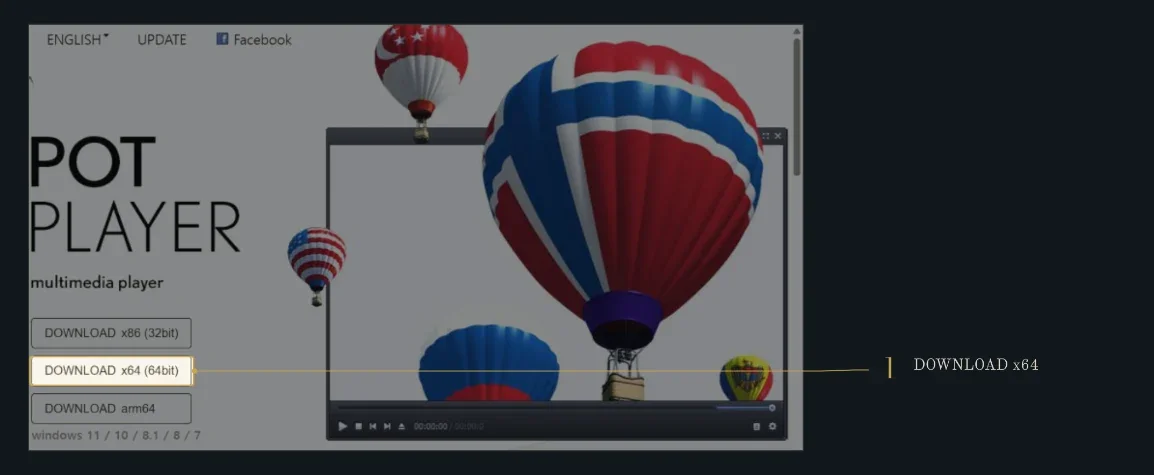
Install with the defaults. It goes to C:\Program Files\DAUM\PotPlayer. Codecs it offers are fine, untick anything else you do not recognize, pretty straightforward I guess and obviously if you use ARM computer, download that version but I don’t have one and idk how well it works over there.
II. Setting up Auto-Subtitling
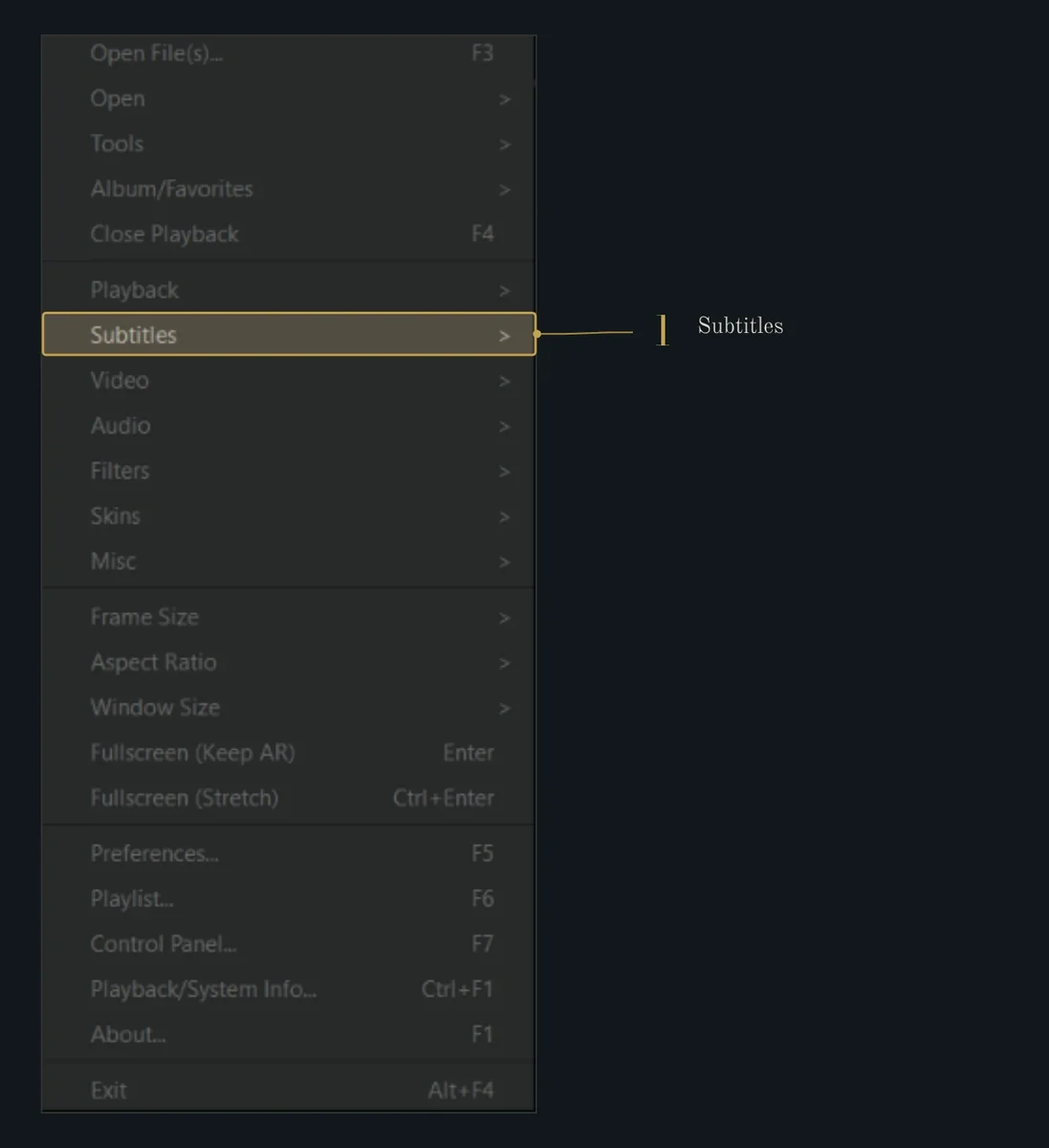
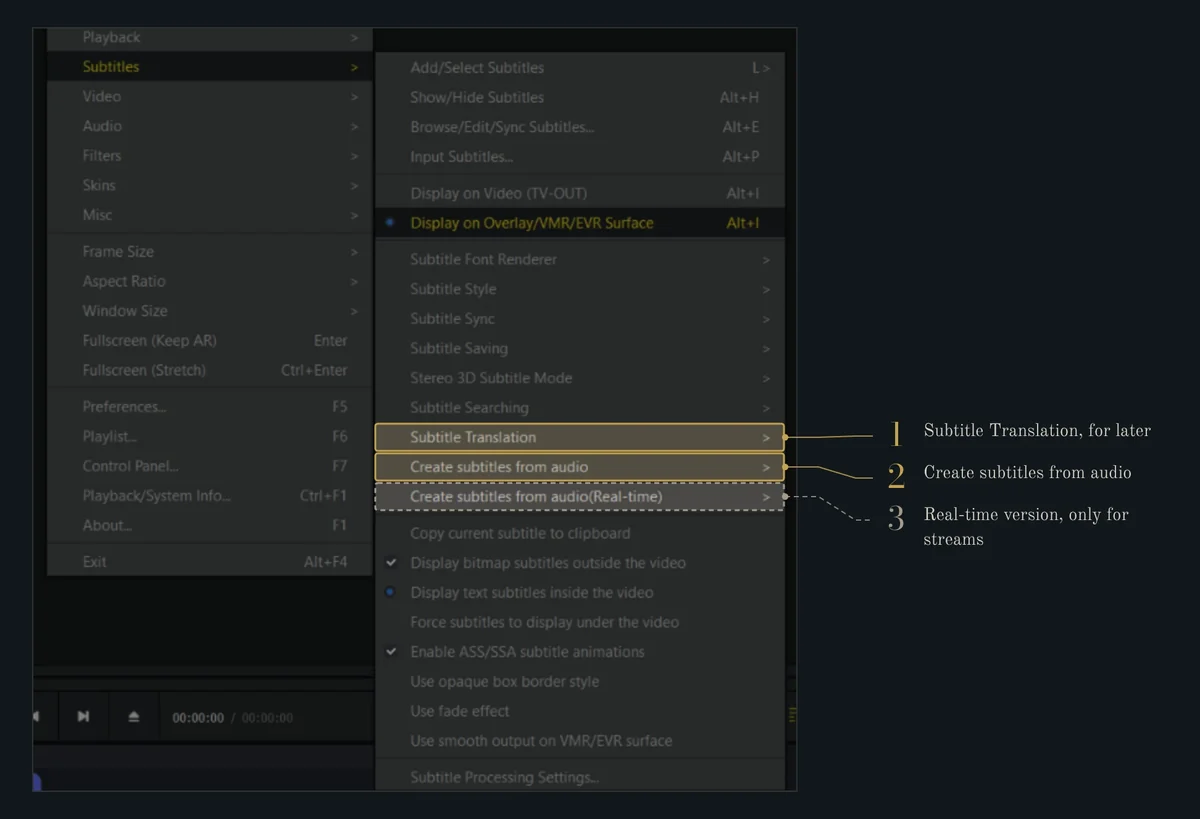
Right-click on a video and go to Subtitles. There are two Whisper options in there. ”Create subtitles from audio” which creates them based on the whole file, and that’s the one I use because Whisper is much better when it has full context. The real-time one works while the video plays but their use-case is only for streamed content I think
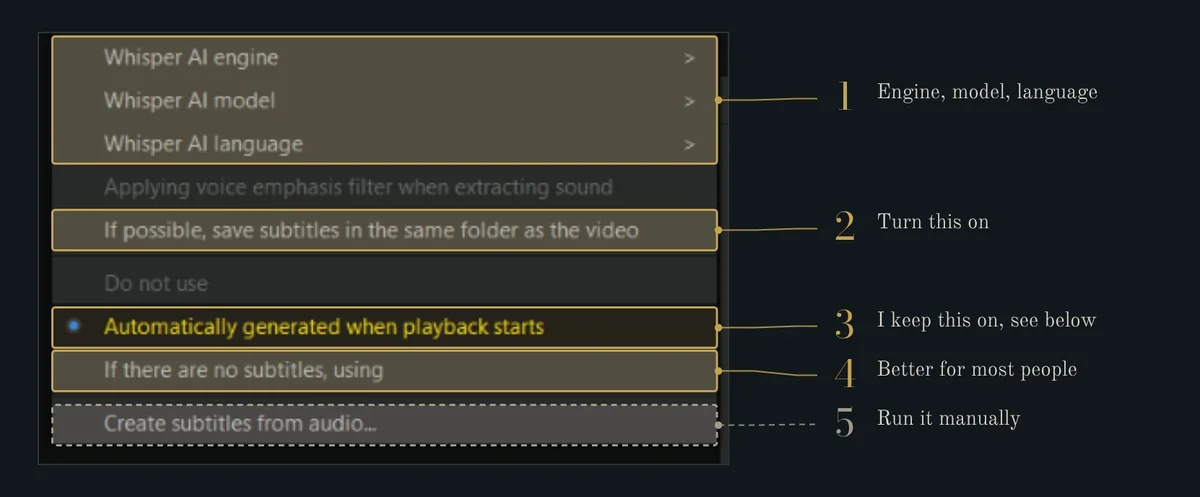
Everything else is inside “Create subtitles from audio⸺
Choosing the Engine
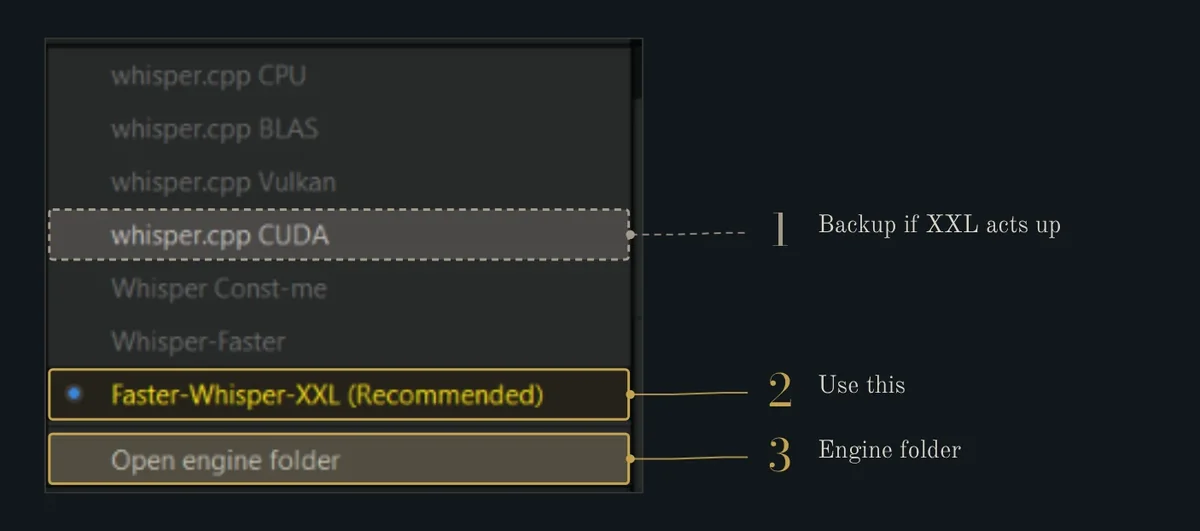
I use (and recommend) Faster-Whisper-XXL. It’s Purfview’s build of faster-whisper, which is a lot faster than OpenAI’s version and uses less VRAM. It uses your NVIDIA card if you have one and the CPU if you don’t. The whisper.cpp ones are backups, CUDA for NVIDIA, Vulkan for AMD or Intel. I never tried them, and I don’t have an AMD chip either, so just adapt the tutorial to your needs if you have a different setup.
Choosing the Model
I only use two, large-v3-turbo and tiny, and I switch between them as needed. turbo is much more accurate. tiny is under 100 MB and barely touches the VRAM, so I use it for English stuff if I ever need it or when I’m multitasking. You can see comparison below.
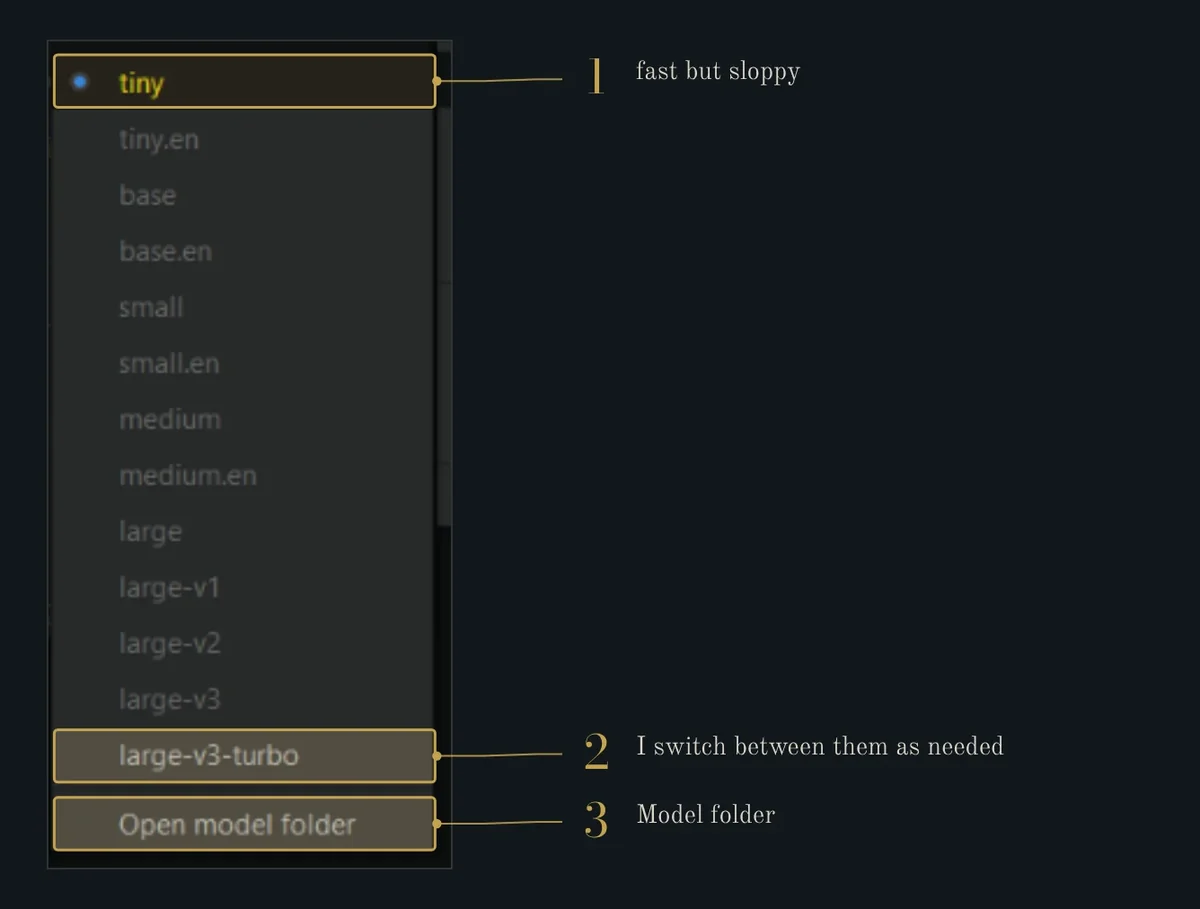
PotPlayer is supposed to download the model when you pick it, but usually it just doesn’t. Downloading it yourself and pasting it into the model folder is easy though, just download it and click open folder to see the model folder. Same goes for the engine, for a full tutorial see below.
III. Downloading models and engines yourself
PotPlayer’s own download fails oftentimes and did fail for me. Either way, I would recommend you download it yourself and paste it into the right folder.
PotPlayer keeps both in AppData, not Program Files:
%APPDATA%\PotPlayerMini64\Model\
%APPDATA%\PotPlayerMini64\Engine\
You can paste those into the Explorer address bar, or use “Open model folder” and “Open engine folder” from the engine and model menus above in PotPlayer ui.
How to download Engine Manually?
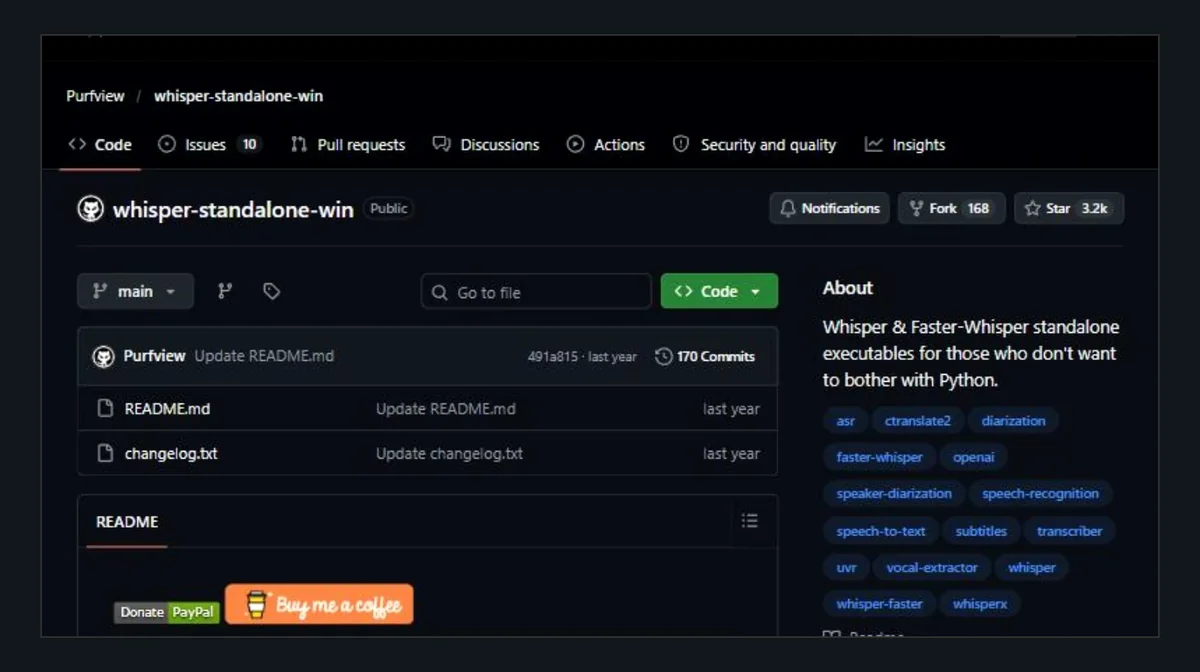
Faster-Whisper-XXL is on Purfview’s GitHub.
- Close PotPlayer.
- Download the latest
Faster-Whisper-XXL_..._windows.7zfrom the releases page. It’s big, mine takes up over 4.5 GB. - Extract it, so you end up with
Engine\Faster-Whisper-XXL\faster-whisper-xxl.exe - Open PotPlayer and pick Faster-Whisper-XXL, it shouldn’t ask to download anymore.
It should look like this⸺
%APPDATA%\PotPlayerMini64\Engine\
└── Faster-Whisper-XXL\
    ├── _xxl_data\
    ├── faster-whisper-xxl.exe
    └── ffmpeg.exe
How to download Models manually?
The models are on Hugging Face (that’s where faster-whisper’s models are hosted, not GitHub). Each model has its own folder called faster-whisper-<model>:

These are CTranslate2 models, a folder with model.bin and some small config files. They’re not the .pt files from OpenAI’s GitHub and not the ggml-*.bin files whisper.cpp uses, so don’t mix them up, just follow the link.
| Model | Download from | Folder name |
|---|---|---|
| large-v3-turbo | dropbox-dash/faster-whisper-large-v3-turbo | faster-whisper-large-v3-turbo |
| tiny | Systran/faster-whisper-tiny | faster-whisper-tiny |
| others | huggingface.co/Systran/faster-whisper-<size> |
faster-whisper-<size> |
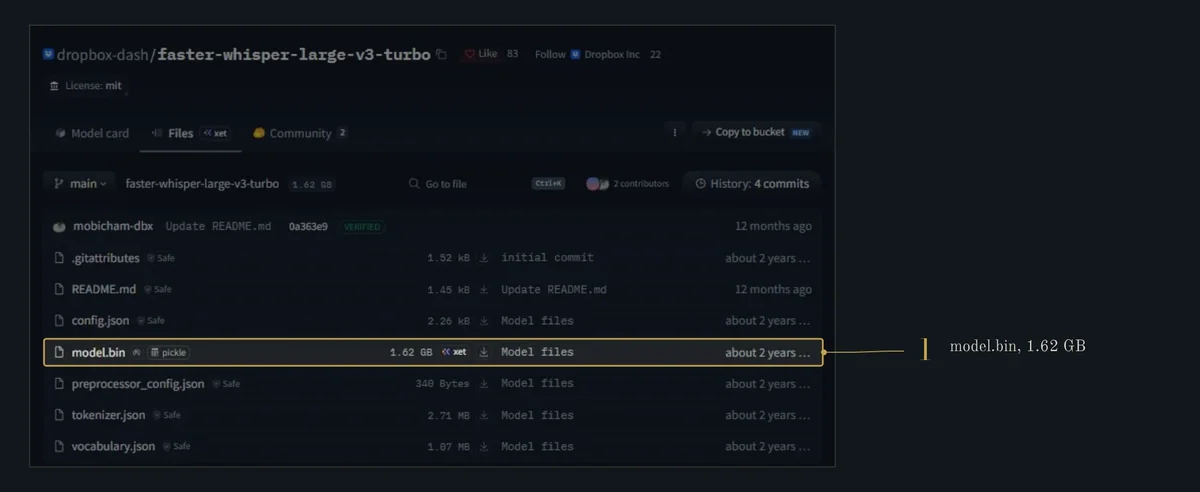
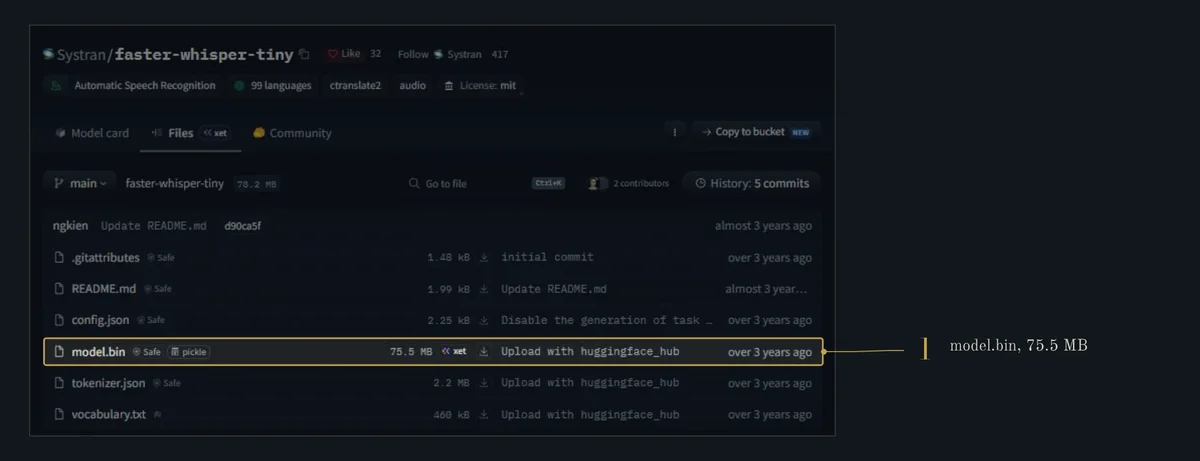
The easiest way is to just download the whole repo into the Model folder, (you can ignore the README and other extra files don’t matter if you download them or not). either click the download arrow and paste them appropriately or open a terminal in %APPDATA%\PotPlayerMini64\Model\ and run one of these:
git lfs install
git clone https://huggingface.co/dropbox-dash/faster-whisper-large-v3-turbo faster-whisper-large-v3-turbo
git clone https://huggingface.co/Systran/faster-whisper-tiny faster-whisper-tiny
or with the Hugging Face CLI (pip install -U huggingface_hub first):
hf download dropbox-dash/faster-whisper-large-v3-turbo --local-dir faster-whisper-large-v3-turbo
hf download Systran/faster-whisper-tiny --local-dir faster-whisper-tiny
Then open PotPlayer and pick the model, it shouldn’t ask to download anymore. It should look something like this in folders (maybe plus the README and whatever else came with the repo)⸺
%APPDATA%\PotPlayerMini64\Model\
├── faster-whisper-large-v3-turbo\
│   ├── config.json
│   ├── model.bin                  (1.62 GB)
│   ├── preprocessor_config.json
│   ├── tokenizer.json
│   └── vocabulary.json
└── faster-whisper-tiny\
    ├── config.json
    ├── model.bin                  (75.5 MB)
    ├── tokenizer.json
    └── vocabulary.txt
If you use a whisper.cpp engine instead, it wants a single ggml-<model>.bin file loose in the same folder. PotPlayer’s server has those at https://twg.kakaocdn.net/potplayer/PotPlayer/whisper.model/ggml-<model>.bin.
IV. Translating Subtitles
Whisper writes subtitles in whatever language the video is in, and PotPlayer can translate them line by line as they come up.
- Right-click, Subtitles, Subtitle Translation (it’s in the Subtitles menu screenshot above).
- Change it from “Do not use” to “Always use”.
- Pick an engine in the same menu.
- Set the target language in the translation settings at the bottom of that menu. Source can stay on auto.
| Engine | Recommendation |
|---|---|
| Google (default) | Yes. Easy to setup, Literalism is useful for language learning, since when they do not match context you learn more about the culture by looking it up online or via a book than when you’re spoon-fed accurate semantics, you NEED literalism to overcome it yourself. |
| Bing, Yandex, Papago | No But I have heard papago is better for east asian languages |
| DeepL | Yes. For tutorials, lectures and movies/animes and non language learning needs. Reads more naturally than Google, but you need a free API key and the free tier has a monthly limit. |
| Libre | No |
| LM Studio | Yes. If you can afford running it, needs LM Studio open with a model loaded. It is proper language model, so it should handle context and tone better, and it’s local |
Whisper also has its own translate-to-English mode but turbo wasn’t trained for it and just returns the original language, so use PotPlayer’s translation for this.
Dual subtitles for language learning
This is how I actually use it most of the time. Instead of only showing the translation, PotPlayer can show the original line and the translation together, so you read the French or Japanese and have your own language right there when you get stuck.
- Set Whisper AI language to the language of the video, not auto. You want Whisper writing the original, not guessing.
- Turn on translation like above and set the target to your language.
- In the same Subtitle Translation menu there are display options, chose your preffered mode.
V. Performance (optional)
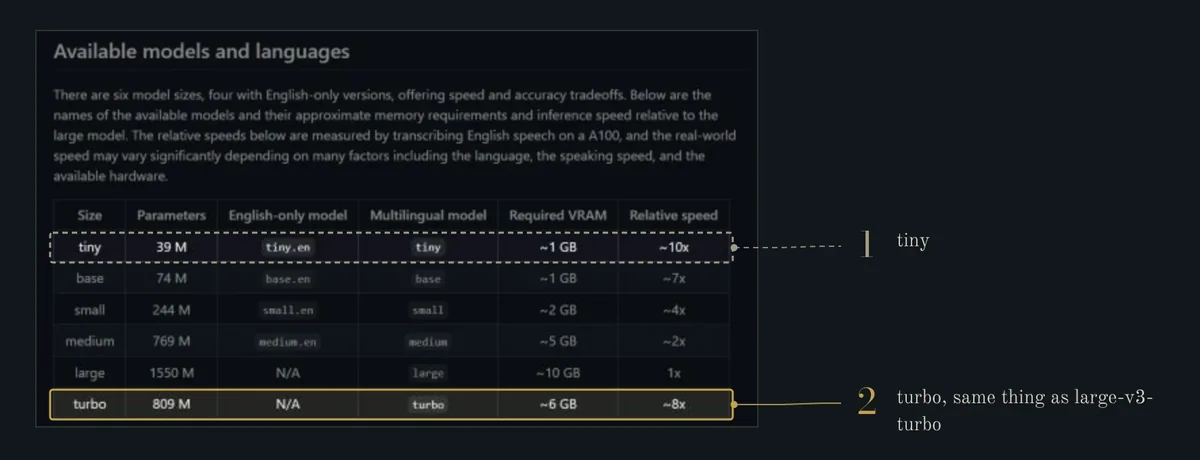
| tiny | large-v3-turbo | |
|---|---|---|
| Parameters | 39 M | 809 M |
| Download | 75.5 MB | 1.62 GB |
| VRAM (OpenAI’s number) | ~1 GB | ~6 GB |
| VRAM with Faster-Whisper | around 0.3 GB | a few GB, the weights alone are 1.6 GB |
| Speed w.r.t. large | ~10× | ~8× |
| My laptop, 1 h of video | about 1.5 min | about 3.2 min |
| My laptop, first subtitle | 8 s | 17 s |
On VRAM, OpenAI’s numbers are about 1 GB for tiny and 6 GB for turbo, but that’s for their original code. Faster-Whisper uses a lot less and turbo has to hold its 1.6 GB of weights plus some working memory, so expect a few GBs. I haven’t measured either.
I’ve only tested tiny and large-v3-turbo, with Faster-Whisper-XXL.
Accuracy
I picked English, French, German, Chinese and Japanese because that’s content I usually watch, so check the links below if you need another language. In English tiny is usable if you just want the gist, but in everything else it is pretty lame but despite it’s errors I didn’t mind using it much for learning French given I hardly care for grammar but just new words but it might be bad for absolute beginners. Chinese and Japanese are counted per character since they don’t use spaces, I found tiny unusable for these two and most non European languages.
These are official numbers from OpenAI, just from two places. tiny is from table 13 of the Whisper paper (appendix D.2.4, there’s a readable version here), and turbo is from the chart in their turbo release post. Both are on the FLEURS dataset. So they’re comparable. FLEURS is also people reading sentences clearly, and real videos with music and people talking over each other will be worse for both.
Speed
I timed both on my laptop (RTX 3050, 4GB VRAM varient, Faster-Whisper-XXL r245.4 running on CUDA) with an 18 min 49 s English video essay as a test. Same engine PotPlayer uses, just run directly so I could time it properly, though i was browsing and doing other tasks so expect pretty relatable conditions.
| tiny | large-v3-turbo | |
|---|---|---|
| Whole video (mine was 18:49) | 27 s | 60 s |
| For an hour of video | about 1.5 min | about 3 to 3.5 min |
| First subtitle after pressing start | 8 s | 17 s |
| How much of that is loading the model | 2 s | 9 s |
So turbo takes a bit over twice as long as tiny on my laptop, but both are way faster than the video itself, tiny is about 40× real time and turbo about 19×. Most of the wait for the first subtitle is just the model loading, turbo is a 1.6 GB file so it takes longer to get going. After that it catches up fast.
In practice, if you press play straight away, the first line of speech in video I used for testing it was at 0:14. tiny had it ready at 8 s, so it was there in time. turbo needed 17 s, so its first few lines would get skipped in real time. If someone starts talking in the first few seconds, you’ll miss the first line or two with turbo, so I either wait a few seconds before pressing play or just rewind a bit, you can alternatively just generate subtitles first and then watch the video, but it works really well with real time use case too. Movies and Animes tend to start well after an introduction so it’s only required for lectures and video essays or similar content.
The official speeds are from an A100, so they only tell you that tiny is a bit faster. On my laptop the gap was bigger, 2.2× instead of the 1.25× you’d expect from OpenAI’s numbers, since turbo is the heavier model to run on a small GPU, specially when multitasking.
The difference in quality showed up straight away too. In the first 30 seconds tiny made two spelling mistakes. Small stuff, but for a language you’re learning that can be an issue, personally I don’t think so. (I think Tiny was reliable enough for learning French and mistakes enhanced my experience by increasing resistance helping me recognize similar words precisely because they were mistaken haha) (❁^◡^❁)
So I switch between them.
VI. Common Issues and FAQs
Ask me on discord if you’ve other issues, or if you suggest a common FAQ I’ll add them too⸺
| Issue | Fix |
|---|---|
| It still wants to download the model after you copied it | Folder name has to be exactly faster-whisper-<model>, and model.bin has to be directly inside it, check it |
| model.bin is 0 KB | Download got cut off, download it again |
| It keeps asking to download the engine, or the zip gives a CRC error | Download Faster-Whisper-XXL from GitHub yourself, see the engine part above. |
| Engine is there but PotPlayer doesn’t see it | faster-whisper-xxl.exe has to be directly inside Engine\Faster-Whisper-XXL\, not one folder deeper |
| Subtitles are nonsense or the wrong language | Set the language yourself |
| Slow and the GPU isn’t doing anything | Check the engine is Faster-Whisper-XXL and your NVIDIA driver is updated |
| Out of memory on turbo | Close other GPU stuff |
| Translation shows nothing | Check your internet connection if you’re using default Google Translate |
| It replaced subtitles that were fine | Switch the mode to “If there are no subtitles”, or turn auto off for that video |